AI meeting notes capture one call. Project memory keeps context across the whole project. Here is the real difference, and when you need each.
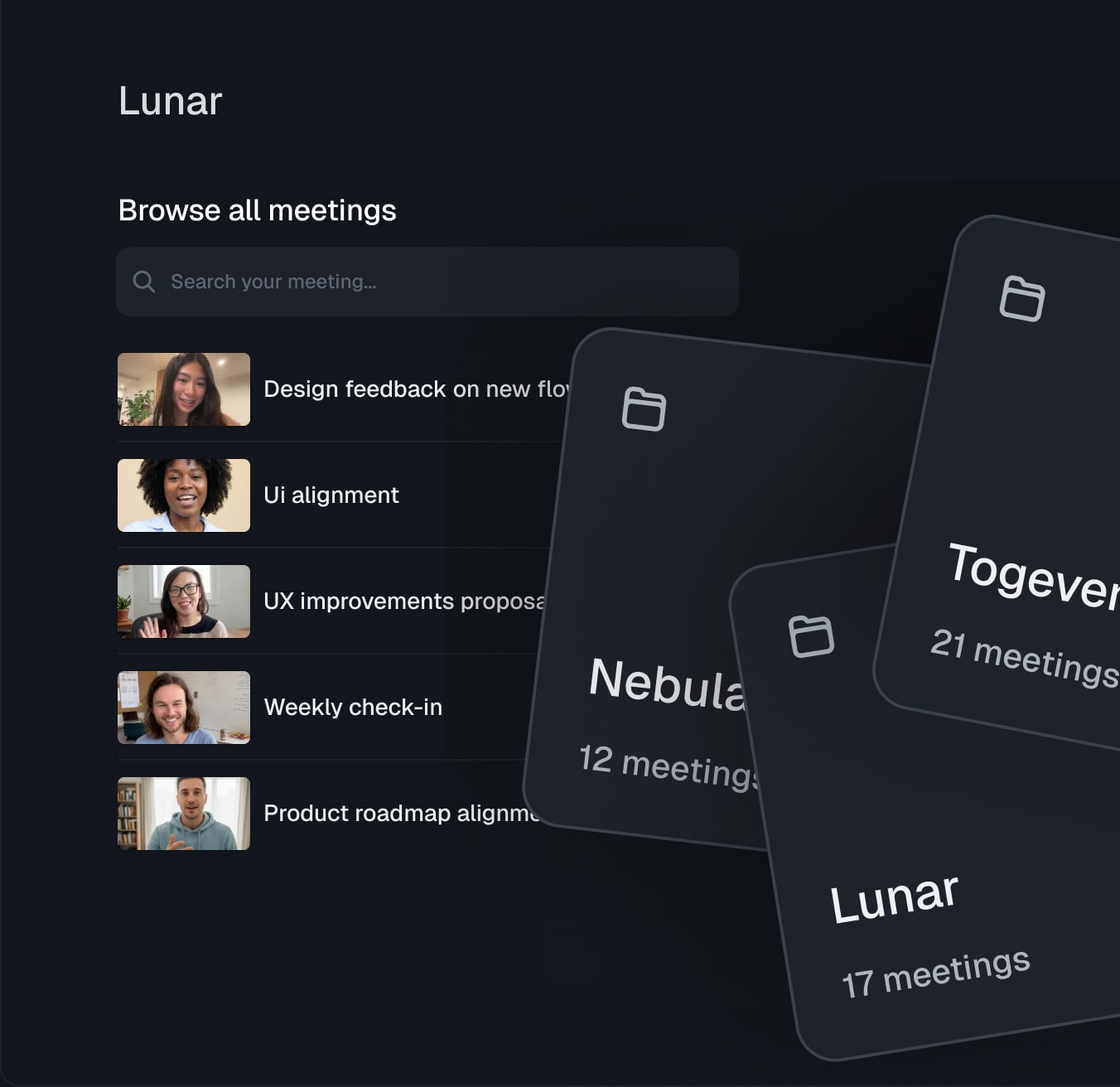
A few years ago, the answer to "how do we remember what happened in that meeting?" was a shared doc and a hopeful prayer. Today, your calendar is probably dotted with AI notetakers, and your team chat has more summaries than humans. That feels like progress. Until the moment a teammate asks, "What did we decide about pricing back in March?" and you realise you have fifty perfect meeting recaps and no actual answer.
That gap is where a new category is forming. Meeting notes are about capturing one conversation. Project memory is about remembering a project. They sound similar, they often overlap, but they solve different problems and they break down in very different ways. If you have already felt that AI notetaker isn't enough, this article is the map.
This is the honest, practical version of the difference, with the scenarios where it actually shows up and a clear way to decide what your team needs.
A category that is quietly splitting in two
For a while, "AI for meetings" meant one thing: a tool that joined your call, transcribed it, and produced a summary. The market exploded around that idea, and most teams now have at least one notetaker installed somewhere.
What changed is the question users started asking. Not "can you summarise this call?" but "can you tell me what we decided across the last six calls, two email threads and that doc Sara updated last Tuesday?" The first question is a meeting problem. The second is a project problem. They need different tools.
Meeting notes tools optimise for a single event. Project memory tools optimise for continuity. The line between them is becoming more visible because teams are starting to feel the limits of stopping at the meeting.
What AI meeting notes actually do
An AI meeting notes tool, also called an AI notetaker, focuses on a single call from start to finish. The output usually includes a transcript, a summary, action items, and sometimes a chat interface to ask questions about that meeting.
The scope is intentionally narrow. The tool listens, captures, and packages the result. Once the meeting is over, that meeting is essentially a closed object: a card in your archive that you can reopen if you remember it exists.
The modern landscape is full of these tools. If you want a clear picture of who does what, the best AI meeting notes tools is a good starting point. Most of them are excellent at the job they signed up for. The catch is that the job stops at the edges of the call.
Some characteristics you can take as the standard for the category:
Unit of work: one meeting.
Inputs: audio, video, sometimes a calendar invite.
Outputs: transcript, summary, action items, occasional chat over that single meeting.
Lifespan: the meeting record is useful while you remember it. After three weeks, most of these notes go untouched.
This is not a flaw. It is the design.
What project memory actually is
Project memory is a layer above meetings. It treats the project as the unit of work and quietly stitches together everything that touches it: meetings, emails, documents, async updates, chat decisions, even handwritten notes that get pasted in.
Instead of producing one tidy artefact per call, project memory builds a living map of your project: who owns what, what was decided and why, what is still open, what changed last week. It does not replace your meeting notes. It absorbs them and connects them to the rest of the work.
This is the operational backbone of solid project knowledge management. Where notes capture moments, project memory captures the thread that runs through them.
A few characteristics that define the category:
Unit of work: the project.
Inputs: meetings, emails, documents, chat, status updates, async notes.
Outputs: a queryable hub where you can ask "what did we decide about pricing?" and get an answer grounded in real sources, not just one transcript.
Lifespan: as long as the project lives, and useful even years later when someone asks why a choice was made.
The shift in mindset is small but important. With meeting notes, the meeting is the asset. With project memory, the project is the asset and meetings are one of its inputs.
A side-by-side comparison
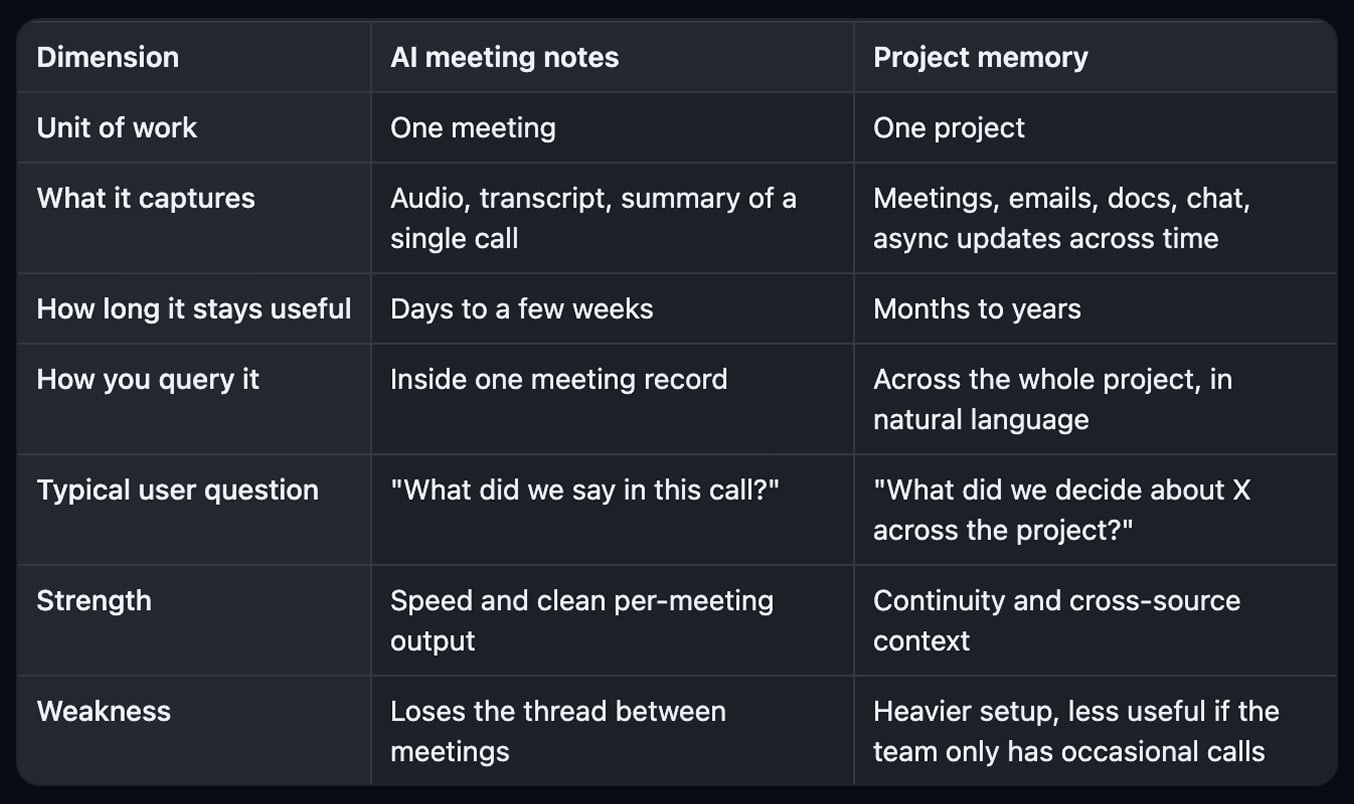
The two are not in competition. A good project memory tool usually captures the meeting too. The difference is what happens after the call ends.
Three scenarios where the difference shows up
The gap between meeting notes and project memory is invisible most days. It surfaces in three very recognisable moments.
The kickoff meeting
A new project starts. The kickoff is intense, full of decisions, assumptions and trade-offs that everyone swears they will remember. With AI meeting notes, you get a clean recap and a list of action items. Useful for the first two weeks.
With project memory, that kickoff becomes the seed of the project hub. Every subsequent meeting, every doc shared, every email about scope adds to the same memory. By the time you reach week six, you do not have to re-read the kickoff transcript. You can simply ask the project what was agreed.
The team handover
A project lead leaves, or a new collaborator joins mid-stream. With meeting notes alone, the handover usually looks like a folder of summaries and a slack of "hey, do you remember…". The new person learns the project the slow way: by interrupting the team.
With project memory, the handover compresses dramatically. The new person can ask the project itself: "What is the current status?", "What did we try and reject?", "Who owns the integration work?". The answers come with sources attached. The team gets fewer interruptions and the new person gets up to speed faster.
The retrospective six months in
This is where meeting notes show their limits most clearly. You are looking back, trying to reconstruct why a decision was made, what changed and what you learned. Without a connecting layer, you scroll through dozens of recaps, open three docs, and piece things together.
This is the real cost of searching for information: not just the lost minutes, but the partial picture you end up making decisions on. Project memory makes this kind of look-back almost trivial. You ask, you get a synthesis, you keep moving.
When you only need meeting notes
Not every team needs project memory. There are situations where a focused notetaker is exactly the right tool.
Sales calls and discovery interviews. Each conversation is mostly self-contained. A clean recap, action items, and CRM-ready output is what matters.
One-off external meetings. Vendor calls, candidate interviews, partnership chats. The meeting is the artefact.
Personal note-taking. Solo founders, consultants, freelancers who mainly need their own better memory of each call.
Teams that already have a strong knowledge system elsewhere. If your project hub is rock solid and someone else is updating it, an AI notetaker is enough on top.
In these cases, the right move is to pick a tool you trust and keep it light. The market has plenty of solid options, including a long list of Granola alternatives if you have already used Granola and want to compare.
When you need project memory
Project memory becomes worth the upgrade when any of these are true:
The same questions keep coming back in your team meetings: "Wait, what did we decide on this?"
You spend real time hunting through past meetings, docs and threads to rebuild context.
Handovers and onboarding feel painful out of all proportion to the work.
You run multi-month or multi-team projects with many moving parts.
The information that drives your project lives across at least three tools (meetings, email, docs, chat).
You are building toward a real single source of truth and need automatic capture to keep it alive.
If two or more of these resonate, an AI notetaker on its own will keep leaking knowledge. A project memory layer is the natural next step.
Can you have project memory without a notetaker?
You can, but in 2026 it is rare to want to. Meetings are one of the highest-density sources of project context, so capturing them is usually part of the package. The better question is the reverse: should you keep a separate notetaker if you adopt project memory?
Most of the time, the answer is no. A modern project memory tool already handles transcription, summaries, and action items, and it adds the cross-meeting layer on top. Lunar, for example, captures meetings without a bot in the call, then connects them to emails, documents, and the rest of the project memory in one place. There is no point in paying for two tools if one covers both jobs cleanly.
The migration is also gentler than people expect. You usually start by replacing the notetaker on a single project, then expand once the team feels the difference.
Try Lunar
If your meeting notes are already good but the project still feels foggy, you do not need another notetaker. You need a memory layer that connects meetings, emails, docs and decisions into one place you can actually ask. That is exactly what Lunar is built for.
Capture every call without a bot, keep the context across the entire project, and ask the project itself in plain language. Early access is free.
Related reading
Notes only matter if they change what happens next. Read meeting action items: how to turn talk into tracked tasks to close the loop between conversations and execution.